The Electronic Public Distribution System (ePDS) in Telangana has revolutionized how citizens manage, verify, and retrieve their food security documents. Under the Joint Responsibility of the Central and State Governments, the Department of Consumer Affairs, Food and Civil Supplies, Government of Telangana operates a highly digitized database designed to streamline ration distribution, eliminate fraudulent records, and ensure maximum transparency.
If you are a resident of Telangana looking to retrieve your digital Food Security Card (FSC)—commonly referred to as a ration card—this comprehensive guide walks you through the official, secure download steps, online e-KYC procedures, mobile app services, and diagnostic troubleshooting methods.
Using the official portal at epds.telangana.gov.in, citizens can execute an FSC Card Download within minutes. Digital copies of your Food Security Card retrieved from official government platforms are fully recognized and completely free of charge. Let’s examine the detailed, step-by-step methods to access your digital card and ensure your family maintains uninterrupted access to subsidized state welfare benefits.
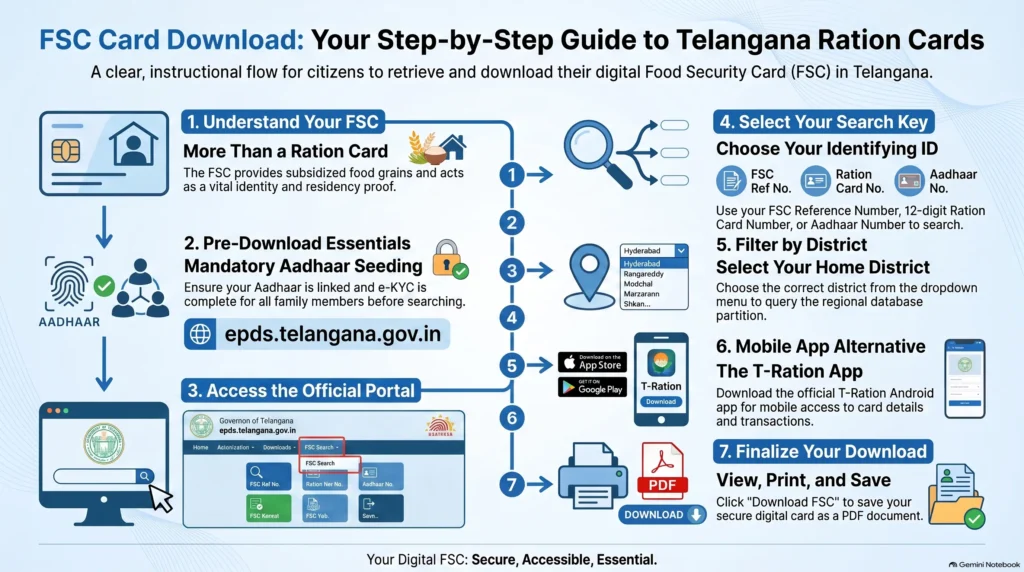
What is a Food Security Card (FSC) in Telangana?
A Food Security Card (FSC) is an official document issued by the Consumer Affairs, Food and Civil Supplies Department of the Government of Telangana. It acts under the legislative mandate of the National Food Security Act (NFSA), 2013, ensuring that poor and economically vulnerable households receive subsidized essential commodities—such as rice, wheat, sugar, pulses, and red gram dal—on a monthly basis through localized Fair Price Shops (FPS).
Beyond its primary function of food distribution, the FSC serves as an indispensable administrative document across Telangana. It is widely accepted by banks, educational institutes, and government offices as:
- Validated proof of residence and state domicile.
- Authentic proof of identity for all family members listed.
- Official proof of economic status used to establish eligibility for state-sponsored welfare programs.
Crucially, the active status of your digital FSC is directly tied to the “Praja Palana” welfare registry, serving as a gateway for eligible households to qualify for six major state-guaranteed schemes:
- Mahalakshmi Scheme: Subsidies and travel benefits for women.
- Gruha Jyothi Scheme: Free electricity up to designated units.
- Yuva Vikasam Scheme: Educational support and scholarship programs.
- Indiramma Indlu Scheme: Subsidized housing and construction assistance.
- Cheyutha Pensions: Social security pensions for vulnerable groups.
- Rythu Bharosa: Direct financial support for agricultural development.
Therefore, keeping your card active, updating its information, and retrieving an official digital copy is vital to preventing any disruption to your family’s civil benefits.
Difference Between a Standard Ration Card and an FSC
Although many citizens and informational blogs use the terms “Ration Card” and “Food Security Card” interchangeably, they have distinct administrative definitions under Indian civil registry schemes:
- Ration Card: This is a broad, historical term representing household categorization. In Telangana, Above Poverty Line (APL) households earning more than Rs. 10,000 annually are issued a White Ration Card. While these families can use the card as legal identity or address proof, they are not eligible for monthly government-subsidized food grains.
- Food Security Card (FSC): This refers specifically to targeted welfare cards under the Targeted Public Distribution System (TPDS). Only BPL (Below Poverty Line) and AAY (Antyodaya Anna Yojana) households receive an FSC, which legally entitles them to buy essential commodities at heavily subsidized rates.
In short, while all Food Security Card holders are registered in the state’s ration card database, not all standard ration card holders qualify for government-supported food subsidies.
Types of Ration Cards in Telangana
To target welfare subsidies effectively, the state government categorizes households based on income thresholds, land ownership limits, and structural vulnerability:
| Card Category | Target Beneficiary Group | Economic & Asset Limits | Subsidized Commodity Benefits |
|---|---|---|---|
| Food Security Card (FSC) / Pink Card | Standard Low-Income Families | • Annual income < Rs. 1.5 Lakh (Rural) or < Rs. 2.0 Lakh (Urban).• Wetland < 3.5 acres or Dryland < 7.5 acres.• Must not pay income tax, own a four-wheeler (non-commercial), or have government employees. | Subsidized rice, wheat, sugar, and essential grains distributed monthly at designated PDS rates. (Currently free till 2028 under PMGKAY). |
| Antyodaya Anna Yojana (AAY) Cards | Poorest of the Poor / Poorest Households | • Landless agricultural laborers, rural artisans (carpenters, potters, blacksmiths), rickshaw pullers, slum dwellers, elderly widows, or disabled individuals heading households with no stable income. | Up to 35 kg of subsidized food grains per household per month, completely independent of family size. |
| White Ration Card | Historic Above Poverty Line (APL) Class | • Annual income above the poverty line, historically earning above Rs. 10,000 annually. | Limited to alternative state verification schemes, administrative registries, or buying non-subsidized civil registry items. |
⚡ Official August 2026 Smart Card Rollout: The Government of Telangana, led by Chief Minister A. Revanth Reddy and Civil Supplies Minister N. Uttam Kumar Reddy, has officially initiated the distribution of over 1.05 Crore compact Smart Ration Cards to eligible families across all 33 districts. These new cards are compact, waterproof, and tear-resistant. Each card displays the cardholder’s name, residential address, photograph, and a secure embedded QR code. Scanning this QR code instantly renders family member listings and monthly transaction history on ePoS devices at Fair Price Shops. The Civil Supplies Department is bearing all printing costs; beneficiaries must not be charged any fees by dealers or centers.
How to Download Telangana FSC Card Online: Step-by-Step Guide
Once your application for a new Food Security Card is approved by regional supply officers, it is logged in the state’s active ePDS database, enabling instant electronic access. Follow these official methods to execute a TS Ration Card Download.
Method 1: Download FSC via Official EPDS Portal (epds.telangana.gov.in)
This is the standard and most reliable method for retrieving a printable copy of your Food Security Card:
- Visit the Official Portal: Open a secure web browser and navigate to the official Civil Supplies URL: epds.telangana.gov.in. Ensure the address bar displays the secure connection (https://) and ends strictly with the official government suffix .gov.in to protect your personal details.
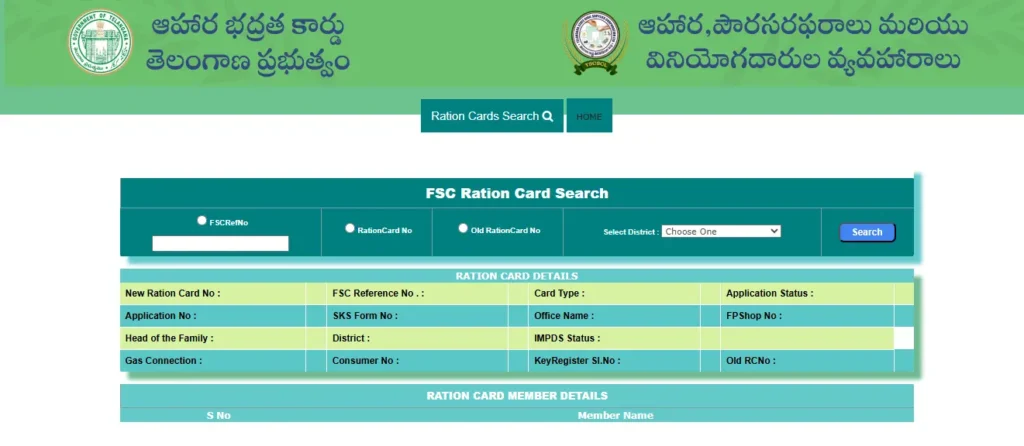
- Navigate to FSC Search: On the homepage, look at the sidebar options. Select “FSC Search” from the menu links.
- Enter the Input Console: On the redirected Search tool page, click once more on the “FSC Search” sub-option to display the input form.
- Select Your District: Choose your registered resident District from the drop-down menu. This step is critical; selecting the wrong district will cause the system to query the incorrect regional database partition and return a “No Record Found” error.
- Enter Your Identification Key: Enter one of the following official numbers in the designated input field:
- FSC Reference Number (received during application submission).
- New 12-digit Ration Card Number.
- Old Ration Card Number (often starting with alphabetic prefix codes like “YAP”).
- Trigger Search: Click the “Search” or “Submit” button.
- Download and Print: If your card is active, the complete card registration details—including the head of household’s name, assigned Fair Price Shop (FPS) number, monthly allocation, and linked family members—will appear on the screen. Click on “Download FSC” or “Print FSC” to save the document as a secure PDF on your device.
Method 2: Search and Download by District, Mandal, and Village
If you have misplaced your application reference slip or do not remember your new 12-digit ration card number, you can trace your card through your localized administrative hierarchy:
- Access the official EPDS Telangana portal.
- Navigate to the “FSC Search” page.
- Select the alternative search option titled “Search by District, Mandal, Village”.
- Choose your registered District, Mandal, and Village from the respective dropdown menus.
- The portal will retrieve a list of all active household card registrations registered under that village’s Fair Price Shop.
- Scroll through to locate your household’s record, note your FSC card number, and use Method 1 or Aadhaar search to print your card.
Method 3: Access and Save e-Ration Card on DigiLocker
The Government of Telangana has fully integrated the Food Security Card database with the national DigiLocker platform, allowing for paperless, immediate administrative verification:
- Open the DigiLocker mobile application on your smartphone or visit the official portal at digilocker.gov.in.
- Log in using your secure Aadhaar-linked mobile number and enter the OTP.
- Navigate to the “Search Documents” console.
- Type and select the issuing authority: “Consumer Affairs, Food and Civil Supplies Department, Government of Telangana”
- Select “Ration Card” from the document list.
- Enter your Ration Card Number and Aadhaar details.
- Click “Get Document”. DigiLocker will fetch the authenticated electronic Food Security Card directly from the Civil Supplies database, storing it permanently in your “Issued Documents” tab for instant, offline address and ID verification.
FSC Search with Aadhaar Number (Telangana Portal Guide)
If your physical card is unavailable and you do not have any reference numbers, the easiest way to check your ration eligibility is through an Aadhaar-based FSC Search.
Why Aadhaar Seeding is Mandatory for PDS
Under the statutory mandates of the National Food Security Act (NFSA) and the central government’s One Nation One Ration Card (ONORC) scheme, Aadhaar seeding—linking the unique 12-digit Aadhaar UID of every family member to the state FSC database—is completely mandatory.
Aadhaar seeding ensures:
- Welfare Integrity: Eliminates “ghost” beneficiaries, duplicate card registrations, and inactive records from the civil database.
- Transaction Security: Enables secure biometric fingerprint or iris authentication at localized retail shops, completely preventing proxy lifting of subsidized grains by unauthorized persons.
- National Portability: Powering the ONORC framework, Aadhaar-linked biometric authentication allows migrant workers, students, and traveling families to access their entitled food grains at any Fair Price Shop across India. The shop’s ePoS terminal connects directly with UIDAI servers, verifies identity, identifies the home state allocation, and disburses food grains.
How to Retrieve and Download Your Card Using Aadhaar
Follow these steps to search for your card using only your Aadhaar number on the state portal:
- Go to the official EPDS Telangana website: epds.telangana.gov.in.
- Click on the “FSC Search” link on the home page.
- Select the designated path: “FSC Search with Aadhaar Number” or “UID Search”.
- Select your home District from the dropdown menu.
- Carefully enter your 12-digit Aadhaar number without spaces, hyphens, or punctuation. Entering even one digit incorrectly will result in a “No Record Found” error.
- Click Search.
- The database will cross-reference the active records. If your Aadhaar is successfully seeded, the screen will display your active Food Security Card, application status (e.g., Approved or Under Review), full family member registry, and your assigned Fair Price Shop (FPS) dealer.
- Use the on-screen “Download” or “Print” buttons to save a copy.
How to Complete Telangana Ration Card e-KYC Online
The Consumer Affairs, Food and Civil Supplies Department of Telangana has made 100% e-KYC completion mandatory for all beneficiaries listed on active ration cards. Beneficiaries who fail to complete their e-KYC risk having their state welfare benefits and food grain allocations temporarily suspended.
Mobile-Based e-KYC Procedure Using Official Apps
To save citizens from waiting in queues, the government provides an online self-verification workflow utilizing secure, mobile-based biometric face recognition:
- Download the Required Applications: Open the Google Play Store on an Android smartphone. Search for and install two official, genuine applications:
- Mera eKYC (developed by the National Informatics Centre, DFPD Division). Verify the developer details on the Play Store before installing to avoid unofficial APK scams.
- Aadhaar Face RD (developed by the Unique Identification Authority of India – UIDAI). Note: Aadhaar Face RD works as a secure background utility service; it does not have a separate launchable app icon.
- Initiate State Verification: Open the Mera eKYC application. Select both your Residing State and Home State as Telangana, then click on Proceed.
- Enter Identity details: Enter the Aadhaar number of the family member whose e-KYC is pending, then click on Generate OTP.
- Complete OTP Authentication: Enter the One-Time Password (OTP) sent to the Aadhaar-registered mobile number. Ensure the Aadhaar-linked mobile SIM is active and receiving SMS signals.
- Biometric Face Capture: Select “Face Authentication” within the app, which automatically launches the secure UIDAI Aadhaar Face RD camera interface.
- Scan Your Face: Align your face inside the displayed on-screen circle. Keep the phone stable in a well-lit area.
- Liveness Check: The app circle’s border will change from red to green when your face is aligned correctly. Once it turns green, blink your eyes. The active liveness detection will capture the scan and securely transmit the biometric packet to UIDAI servers.
- Status Sync: If the face match is successful, the app will show “e-KYC Complete”. Biometric updates generally take 24 to 48 hours to sync across state databases. You can verify your status on the official SmartPDS portal (smartpds.telangana.gov.in) under “Beneficiary Details”.
Offline e-KYC Alternative at Fair Price Shops (FPS)
If you do not have a compatible smartphone, face authentication fails due to lighting issues, or you are completing e-KYC for elderly family members with worn facial features, you must use the offline method:
- All listed family members whose e-KYC is pending must visit their assigned Fair Price Shop (Ration Shop).
- Inform the dealer that you need to complete your pending ration card e-KYC.
- Place your finger on the biometric ePoS (electronic Point of Sale) fingerprint scanner attached to the dealer’s terminal.
- The device will instantly verify your biometrics against the Aadhaar registry, seeding your status on the spot.
Downloading FSC Details via T-Ration Mobile App
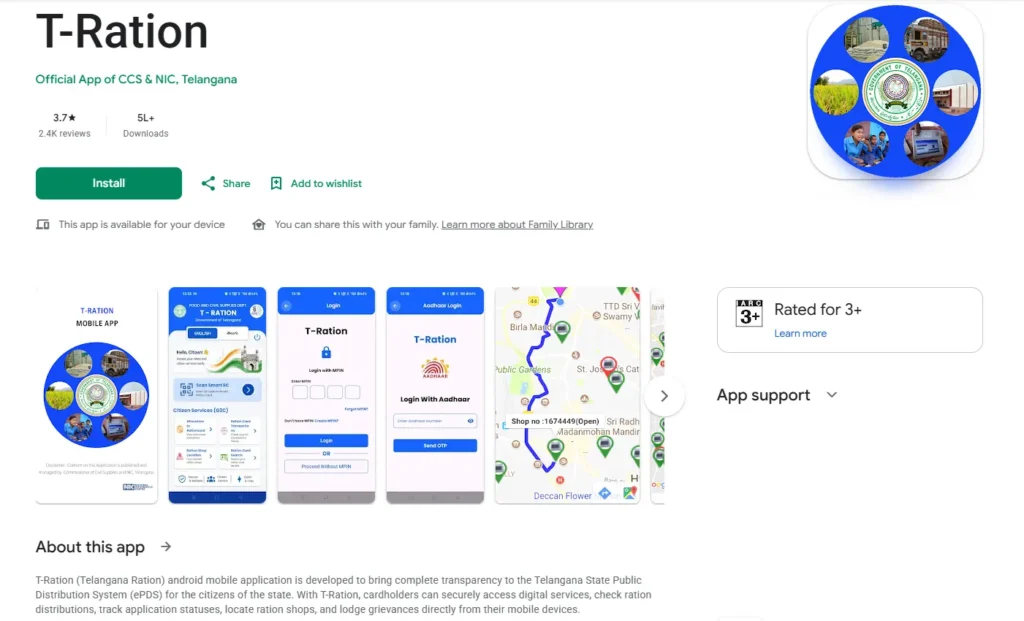
Developed in partnership by the Consumer Affairs, Food and Civil Supplies Department and the National Informatics Centre (NIC), Telangana, the T-Ration Android application acts as a digital service portal for cardholders.
G2C (Government to Citizen) App Services
By completing a secure Aadhaar and OTP-based mobile registration, citizens can use the T-Ration G2C module to access several vital services:
- FSC Search & RC Allocation: Retrieve digital profiles, active family members, and monthly commodity allocations.
- RC Transactions: Track past transactions, receipt details, and drawn commodities.
- GIS Shop Locator: View nearby Fair Price Shops on an interactive map within a 3km radius, complete with navigation.
- Smart Scan RC: Redressed feature allowing users to scan the QR code of their physical smart ration cards to instantly retrieve and download digital profiles.
- Grievance Redressal: Submit PDS complaints, attach photos, and receive automated SMS notifications with a tracking number.
Troubleshooting App Performance Bottlenecks
While T-Ration is highly useful, users frequently encounter minor software issues. Here is how to resolve common app errors:
- App Signature Verification Failed: This error commonly occurs on newer Android versions (like Android 16 or 17 on Pixel devices). It is caused by corrupted system caches during background updates. Solution: Uninstall the app completely, clear your device’s Google Play Store cache, and perform a fresh install of the latest official version (v1.32).
- OTP Verification Loops & Automatically Closing Apps: Delay in receiving SMS verification codes remains a common issue on congested networks. If the app closes while waiting for OTP, verify that your registered mobile number has active signal strength or try accessing the app during off-peak hours.
- Biometric Database Sync Delays: After completing your e-KYC on the Mera eKYC app, it can take up to several days for the updated seeding status to sync and reflect on the SmartEPDS or T-Ration portals. Do not panic if changes are not visible immediately; wait 48 hours for the central server queue to refresh.
Common Problems & Solutions During FSC Card Download
If you encounter errors while trying to search or download your Food Security Card online, use these official troubleshooting solutions to resolve them:
Problem 1: “No Record Found” / District Mismatch Error
- The Cause: This is the most common portal error. Users often enter their Aadhaar or FSC application number correctly but select the wrong District dropdown menu. Because the Telangana ePDS database is regionally partitioned, selecting an incorrect district forces the query to look in the wrong partition, returning a blank result.
- The Solution: Double-check your initial application receipt and verify the exact district where your application was submitted. Select the correct district from the dropdown and re-enter your details without spaces.
Problem 2: EPDS Telangana Website Slow or Not Loading
- The Cause: Server overload is extremely high during peak ration distribution windows (typically from the 1st to the 10th of every month). Millions of transactions and active queries crash the server thread pool, leading to loading loops or database timeout errors.
- The Solution: Clear your browser’s cookies and cache, or try accessing the portal during off-peak hours (early morning between 6:00 AM and 9:00 AM, or late evening after 8:00 PM) when traffic is low. Alternatively, use Method 3 (DigiLocker) to retrieve your card.
Problem 3: Aadhaar Not Linked to Ration Card
- The Cause: If you search using your Aadhaar number and the portal returns “Aadhaar not seeded,” it indicates your Aadhaar has not been mapped to your FSC application record in the civil supplies database.
- The Solution: You cannot link a new Aadhaar entirely online. You must visit your nearest MeeSeva Center or block supply office, submit a physical application form with copies of family Aadhaar cards, complete biometric fingerprint verification, and wait 5 to 15 working days for official backend approval and database updating.
Frequently Asked Questions (FAQs) About Telangana FSC
Can I apply for a Telangana ration card online?
No. While you can download the official “Application for New Food Security Card” PDF from the MeeSeva or Civil Supplies portal, the final submission must be done in person. You must physically submit the completed form with supporting documents (Aadhaar cards, state domicile proof, income certificate) to your nearest authorized MeeSeva or Praja Palana center, pay the Rs. 30 service fee, and collect your tracking acknowledgment slip.
How long does it take to get a ration card in Telangana?
The standard service-level agreement (SLA) for supply officers to conduct field verification, inspect income proofs, and digitally issue a new Food Security Card in Telangana is 30 working days from the date of submission. You can track your application status online using your MeeSeva number.
What is the official helpline number for Telangana ePDS queries?
For queries regarding pending applications, e-KYC verification, or to report an issue with a Fair Price Shop dealer, you can contact the official Consumer Affairs, Food and Civil Supplies Department toll-free helplines at 1967 or 1800-4250-0333. Official support email is also available at pmu_pm_cs@telangana.gov.in.
Links & Reference Portals
- Official ePDS Portal: epds.telangana.gov.in
- MeeSeva Online Services: meeseva.telangana.gov.in