Managing your household’s government records can often feel like solving a complex puzzle. In Telangana, the Food Security Card (FSC)—commonly known as the Ration Card—is one of the most vital documents your family can own. Issued by the Consumer Affairs, Food & Civil Supplies Department, this card does much more than ensure your family has access to monthly subsidized food grains. It serves as a primary proof of identity, a family ID, and is a mandatory prerequisite for accessing highly sought-after state welfare initiatives like the Gruha Jyothi electricity subsidy, Indiramma Indlu housing, and the Mahalakshmi scheme.
Whether you have recently welcomed a newborn, celebrated a marriage, or experienced the loss of a loved one, keeping your Ration Card up to date is crucial. This comprehensive guide walks you through the exact process to add or remove a family member’s name from your TS Ration Card in 2026, ensuring your benefits remain uninterrupted.
Understanding the TS Food Security Card (FSC) Ecosystem
In Telangana, while the terms “Ration Card” and “Food Security Card” are used interchangeably by the public, the state government specifically utilizes the term Food Security Card (FSC) for welfare-backed cards. The system is managed under the state’s advanced electronic Public Distribution System (ePDS).
The ePDS operates through three core digitized modules to ensure transparency and clean database management:
- Aadhaar Seeding Module: Links each family member to their unique Aadhaar number to prevent duplicate or ghost enrollments.
- Ration Card Management Module: Oversees database modifications such as adding or removing members, handle transfers, and card type conversions.
- Allocation Module: Calculates and distributes food grain allocations to local Fair Price Shops (FPS) based on the verified headcounts in the active database.
The state primarily issues three types of cards:
- White Ration Card (PHH / Priority Household): Issued to low-income families. In rural areas, the family’s annual income must be below INR 1.5 Lakhs; in urban areas, it must be below INR 2.0 Lakhs. Wetland holdings must not exceed 3.5 acres, and dry land must not exceed 7.5 acres.
- Pink Ration Card (Non-Priority Household / APL): Issued to families above the poverty line who do not qualify for subsidized grains but use the card as an identification document.
- Antyodaya Anna Yojana (AAY) Card (Yellow Card): Reserved for the poorest of the poor (e.g., landless laborers, marginalized artisans, elderly widows, or disabled-headed households). These households receive a fixed monthly quota of 35 kg of food grains regardless of family size.
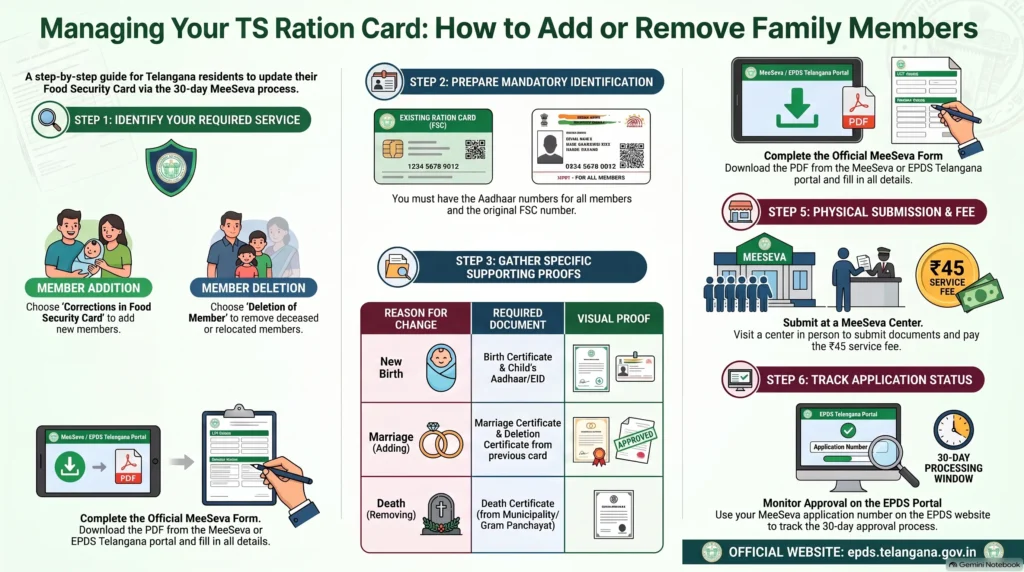
Adding a Family Member’s Name to Your TS Ration Card
Adding a name is legally classified under the service “Corrections in Food Security Card” or “Ration Card Member Addition”. Rather than issuing an entirely new card, this process appends the new member to your existing household registry.
Common Scenarios for Member Addition
- Birth of a Child: Adding a newborn to the household register.
- Spouse Entry After Marriage: Adding a newly married spouse who has migrated to your household.
- Legal Adoption: Appending an adopted child to the family unit.
Mandatory Document Checklist for Additions
To prevent delays or application rejections, you must gather the specific documents designated for your scenario:
- For a Newborn Child:
- Completed “Corrections in Food Security Card” application form.
- Official Birth Certificate issued by the Municipality or Gram Panchayat.
- Child’s Aadhaar Card (or Aadhaar Enrollment ID/EID slip if the physical card is pending).
- Copy of the existing Food Security Card (FSC).
- For a Newly Married Spouse:
- Completed “Corrections in Food Security Card” application form.
- Official Marriage Certificate.
- Spouse’s Aadhaar Card (with updated married surname/address, if applicable).
- Deletion Certificate or No Objection Certificate (NOC) from the spouse’s previous parental Ration Card. This is critical to prevent duplicate enrollment, which triggers automatic system rejections.
- For an Adopted Child:
- Registered Legal Adoption Deed.
- Child’s Birth Certificate and Aadhaar Card.
- Existing family FSC copy.
Removing a Family Member’s Name from Your TS Ration Card
Omission of a name is handled under the “Deletion of Member in Ration Card” service. Keeping your family registry cleaned of migrated or deceased members is vital to prevent ration fraud and ensure you remain compliant with civil supplies policies.
Common Scenarios for Member Deletion
- Death of a Member: Removing a deceased family member from the card.
- Out-Marriage (Migration): Deleting a daughter or family member’s name who has married and is moving to their spouse’s household card.
- Permanent Relocation: Removing a family member who has permanently shifted to a different state or independent household.
Mandatory Document Checklist for Deletions
Ensure you submit clear scanned copies of the following:
- In the Event of Death:
- Completed “Deletion of Member in Ration Card” application form.
- Official Death Certificate from the local municipal corporation or Gram Panchayat.
- Aadhaar card copy of the deceased member (for system-level unlinking).
- Original Food Security Card copy.
- In the Event of Out-Marriage (Migration):
- Completed deletion form.
- Marriage Invitation Card or Marriage Certificate as proof of relocation.
- Aadhaar Card of the migrating member.
- Declaration signed by the Head of the Household (HOF) authorizing the deletion.
- In the Event of Permanent Relocation:
- Completed deletion form.
- Proof of the member’s new address (e.g., updated utility bill or rental agreement).
- HOF-signed deletion declaration.
Step-by-Step Procedure: The TS Hybrid Online/Offline Process
A common point of confusion for citizens is whether this process can be done entirely online from home.
Crucial Clarification: Telangana operates under a hybrid e-governance model. While you can download the application forms online and track your application status digitally via the ePDS portal, the finalized physical dossier must be submitted in person at an authorized kiosk.
Follow these steps to submit your application successfully:
Step 1: Download the Official Application Forms
Do not use generic templates from third-party sites. Download the official PDFs directly from the MeeSeva or district administration portals:
- For additions, search for the “Corrections in Food Security Card“ form.
- For deletions, request the “Deletion of Member in Ration Card“ form.
Step 2: Fill Out the Form Carefully
- Provide your exact 36-series Food Security Card (FSC) Number at the top of the form.
- Fill in the Head of the Household (HOF) details, current address, active mobile number, and social status (General/BC/SC/ST).
- In the dedicated tables, enter the Aadhaar number, member name (matching Aadhaar exactly), age, gender, and relationship to the HOF.
- For address corrections or changes, fill out the integrated gas connection details (Gas Company, Consumer Number, and Agency Name) to ensure your LPG subsidy remains linked.
Step 3: Submit at an Authorized Center
Take your completed physical application form, passport-size photographs, and original supporting documents to:
- Your nearest MeeSeva Center.
- A Praja Palana Seva Kendra (during active state registration drives).
The operator will scan your documents, digitize your details into the Civil Supplies ePDS portal, and upload the proofs.
Step 4: Collect Your Acknowledgement Slip
Always pay the fixed fee and collect your MeeSeva Transaction Receipt. This receipt contains your unique application/reference number, which is required to track your status.
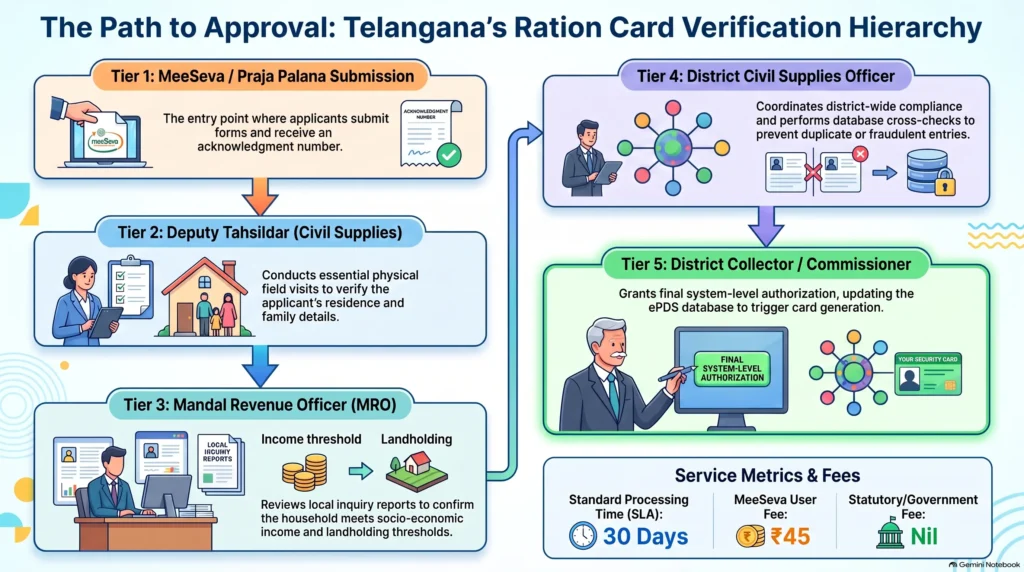
Step 5: The Multi-Tiered Government Verification Hierarchy
Once submitted, your application does not simply update automatically. It is routed through a rigorous, multi-tiered bureaucratic verification pipeline to ensure eligibility and database integrity:
SLA Timelines, Fees, and Cost Model
Under the Telangana Right to Services Act, government departments are bound by strict Service Level Agreements (SLAs) regarding user fees and processing times.
The Mathematical Cost Model
- MeeSeva Service/User Charge: Standardly fixed at INR 45 for all civil supply modification, addition, and deletion requests.
- Government Fee: Standardly fixed at INR 0 for modifications.
- Scanned Document Fee: Valued at INR 2 per page.
- Total Page Count: The total number of pages representing your completed application form and all appended supporting certificates.
- Free Scanning Threshold: The government-mandated base threshold of 5 free pages, meaning scanning charges only apply from the 6th page onward.
Example: If you submit a 3-page application dossier, you will pay exactly INR 45. If you submit a detailed 8-page dossier, you will pay INR 45 + (INR 2 x 3) = INR 51.
Official SLA Timelines
- Corrections / Additions / Deletions: The standard legal SLA timeline for processing these requests is 30 days.
- Ration Card Data Corrections (Routine Database Errors): Minor corrections not requiring extensive field investigations are cleared within 7 days.
How to Track Application Status & Download Updated Cards
How to Check Your FSC Status Online
- Visit the official ePDS Telangana portal at epds.telangana.gov.in.
- Click on the “FSC Search” link in the main navigation menu.
- Select “FSC Application Search” from the dropdown menu.
- Select your district from the dropdown list.
- Choose your search method: enter your Aadhaar Number (of the family head) or the MeeSeva Application Number from your receipt.
- Click “Search” to view your real-time processing stage (e.g., Submitted, Under Review, Field Verification Pending, Approved, or Rejected).
How to Download Your Digital e-Ration Card
Once your status displays “Approved”, your digital card is immediately generated.
- Via ePDS Portal: Search your card under “FSC Search,” view the approved family list, and click the download button to save a legally valid PDF copy.
- Via DigiLocker: Open the DigiLocker app, search for the Consumer Affairs, Food and Civil Supplies Department, Telangana, enter your FSC number, and pull your digital card directly into your issued documents folder.
Troubleshooting & Policy Implementation Challenges
The Family Register Certificate (FRC) Dilemma
In July 2026, the state introduced the automated Family Register Certificate (FRC) via MeeSeva 2.0 to dynamically pull family details from the FSC database. While highly useful for state-level welfare mapping, the Election Commission of India (ECI) rejected the FRC as a valid proof for electoral roll revisions.
The ECI reiterated that Ration Card databases are designed for food security allocation and do not constitute absolute proof of citizenship or permanent residency. Thus, while updating your card secures your local benefits, keep in mind that you may still require independent certificates for federal civic duties.
Continuous e-KYC and Biometric Seeding
To clean up the PDS registry, the department made continuous Aadhaar e-KYC mandatory. Discrepancies between the spelling of a name on an Aadhaar card versus the existing Ration Card registry are a leading cause of biometric mismatch rejections at the Fair Price Shop.
If your benefits are suspended, you must:
- First update your name details at an authorized Aadhaar Seva Kendra.
- Submit an FSC database correction form via MeeSeva to match your updated Aadhaar records.
Frequently Asked Questions (FAQ)
Can I submit my name addition form completely online from home?
No. While you can download the forms and track your application status online, the finalized physical form and physical photocopies of certificates must be submitted in person at a MeeSeva center or Praja Palana center for biometric verification and digitization.
Why was my member addition request rejected under “Aadhaar Mismatch”?
This occurs when the name, age, or spelling entered on your application form does not match the records in the UIDAI Aadhaar database. Ensure you write the name exactly as it appears on the new member’s Aadhaar card.
What are the scanning charges at a MeeSeva kiosk?
Scanning is completely free for the first 5 pages of your application dossier. Starting from page 6, MeeSeva charges a nominal fee of INR 2 per page.
How do I avoid “Duplicate FSC Found” rejections when adding a newly married spouse?
Before submitting an addition form for your spouse on your household card, your spouse’s name must first be officially removed from their previous parental Ration Card. You must attach the official Deletion Certificate or NOC to your addition dossier.
Placement Note: This guide is grounded exclusively in the official civil supplies documentation, MeeSeva ESD citizen charters, and state ePDS policies of the Government of Telangana.