Managing your Food Security Card (FSC)—commonly known as a Ration Card—in Telangana is vital for securing essential food supplies and accessing state-level welfare programs. With Telangana transitioning its Public Distribution System (PDS) into a highly efficient, biometrically validated digital ecosystem, residents must understand how to navigate the system online.
This comprehensive guide walks you through every aspect of the FSC Search system, including step-by-step instructions for checking your application status, linking your Aadhaar card, completing mandatory e-KYC, and troubleshooting common ePDS portal errors.
Understanding Telangana’s Digital Welfare Infrastructure: ePDS vs. ePoS
To manage ration cards and track benefits effectively, you must understand the distinction between Telangana’s two primary, interconnected digital portals:
The ePDS Portal (epds.telangana.gov.in)
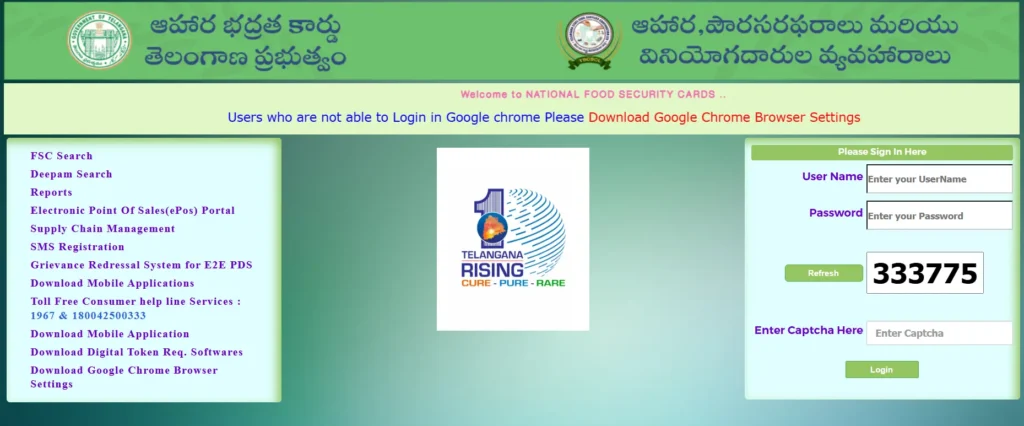
The ePDS (Electronic Public Distribution System) portal serves as the state’s public-facing administrative interface. Developed and maintained by the Consumer Affairs, Food and Civil Supplies Department, this platform hosts all citizen-centric services. Through ePDS, you can perform an FSC search, track the status of new registrations, request correction of details (such as names or addresses), and download a digital copy of your card.
The ePoS Portal (epos.telangana.gov.in)
The ePoS (Electronic Point of Sale) portal functions as the transactional ledger operating at Fair Price Shops (FPS). It manages real-time point-of-sale activities, records biometric fingerprint or iris authentication when grain is distributed, tracks dealer-level inventory, and coordinates the supply chain.
Core Backend Modules
The unified state database operates through three distinct, automated modules:
- Aadhaar Seeding Module: Links unique 12-digit Aadhaar identifiers with the family member registries in the State Resident Data Hub (SRDH) to prevent duplicate, fake, or inactive cards.
- Ration Card Management Module: Handles lifecycle requests such as household splits, member migrations, adding newborns, deleting deceased members, and address changes via MeeSeva centers.
- Allocation Module: Automates stock orders for each Fair Price Shop by calculating closing stock balances against active beneficiary counts to prevent physical grain diversion.
Ration Card vs. Food Security Card (FSC): What is the Difference?
While citizens frequently use the terms “Ration Card” and “Food Security Card” interchangeably, they serve different administrative purposes under the law:
| Feature | Ration Card (APL White Card) | Food Security Card (FSC Pink Card) |
|---|---|---|
| Target Demographic | Above Poverty Line (APL) households earning more than ₹10,000 annually | Below Poverty Line (BPL) and Antyodaya Anna Yojana (AAY) families |
| Subsidized Commodity Eligibility | No eligibility for subsidized food grains under the National Food Security Act (NFSA) | Fully eligible for monthly subsidized food grains and essential commodities |
| Primary Utility | Serves strictly as a valid document for identity and address proof | Acts as both an identity document and a welfare benefit card |
Classification of Ration Cards in Telangana
Telangana categorizes welfare cards to distribute subsidized commodities equitably:
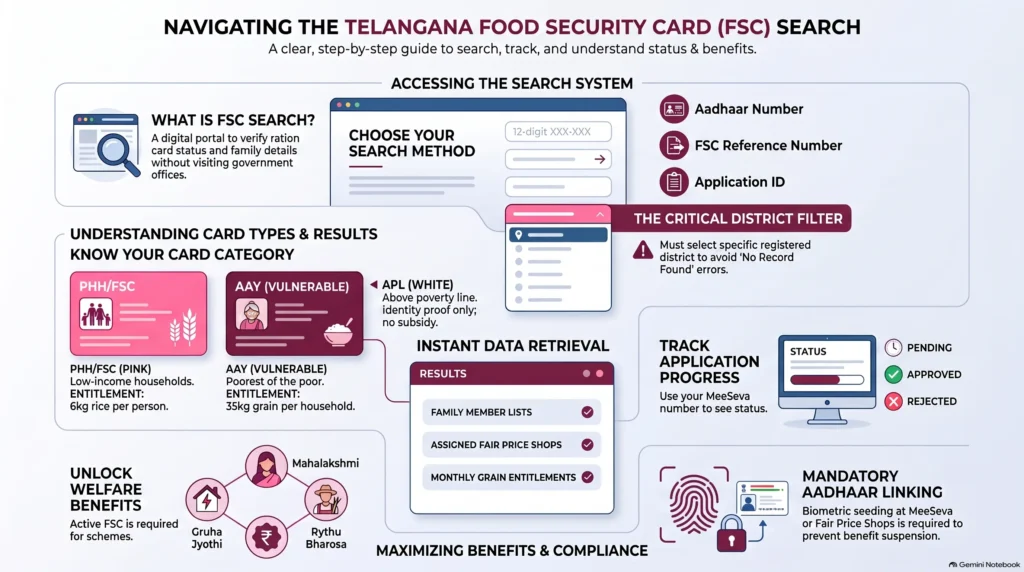
- Priority Household (PHH) / FSC (Pink Card): Issued to families meeting basic poverty line criteria.
- Income Eligibility: Rural annual income under ₹1.5 lakh; urban annual income under ₹2.0 lakh.
- Landholding Ceilings: Wetland under 3.5 acres; dryland under 7.5 acres.
- Commodity Allotments: 5 kg to 6 kg of subsidized rice per person per month. The subsidized state pricing model provides rice at ₹3/kg, wheat at ₹2/kg, and coarse grains at ₹1/kg, though central schemes currently distribute basic grains for free through 2028.
- Antyodaya Anna Yojana (AAY) / AFSC (Yellow Card): Designed for the poorest of the poor (e.g., landless agricultural laborers, rural artisans, elderly widows, and disabled heads of household with no stable income).
- Income Eligibility: Standard income and asset rules are waived due to extreme categorical vulnerability.
- Commodity Allotments: Up to 35 kg of food grains per household per month, regardless of family size.
- Above Poverty Line (APL) White Card: Serves as a legacy identifier for non-subsidized households earning above the poverty thresholds. No commodities are allocated.
How to Perform an FSC Search Online: 5 Step-by-Step Lookup Channels
The ePDS portal accommodates varying levels of technical literacy by offering multiple digital query channels to find your Food Security Card details:
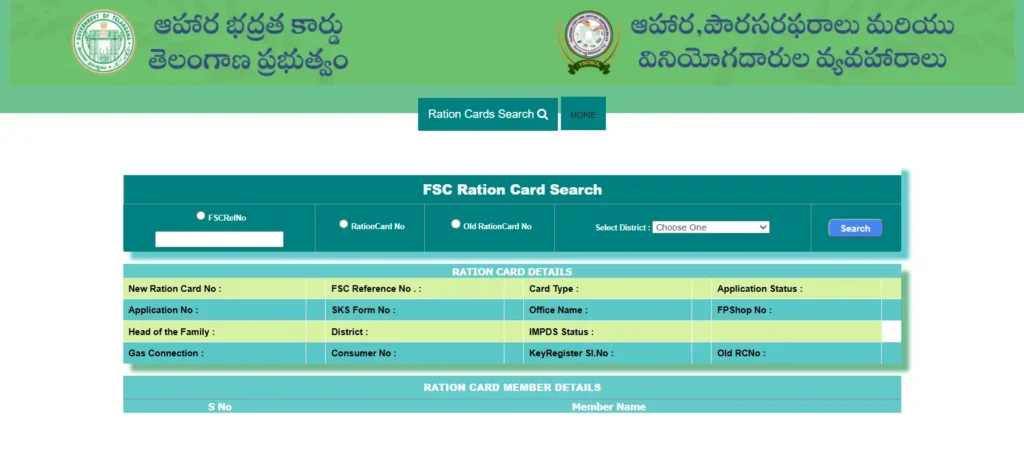
Channel 1: Aadhaar-Based FSC Search (Most Popular)
Searching by your 12-digit Aadhaar number is the most reliable method (95% success rate) and does not require you to remember your card number.
- Go to the official ePDS Telangana website: epds.telangana.gov.in.
- Click on the FSC Search option in the menu.
- Select the sub-option FSC Search, followed by Search by Aadhaar Number (or “UID Search”).
- Enter your 12-digit Aadhaar number continuously without spaces or hyphens.
- Select your registered district from the dropdown menu.
- Complete the on-screen CAPTCHA security verification.
- Click Search. Your complete card roster, including all linked family member names, active status, and assigned FPS dealer, will appear instantly.
Channel 2: FSC Reference or Ration Card Number Search
If you already possess your card number or reference code, you can bypass Aadhaar biometric verification.
- Navigate to the FSC Search section on the ePDS portal.
- Select your registered district from the dropdown menu.
- Input your unique FSC Reference Number (typically starting with district codes like MB or RR) or your new/old ration card number.
- Click Search to display your card profile and entitlement metrics.
Channel 3: Tracking with MeeSeva Application ID
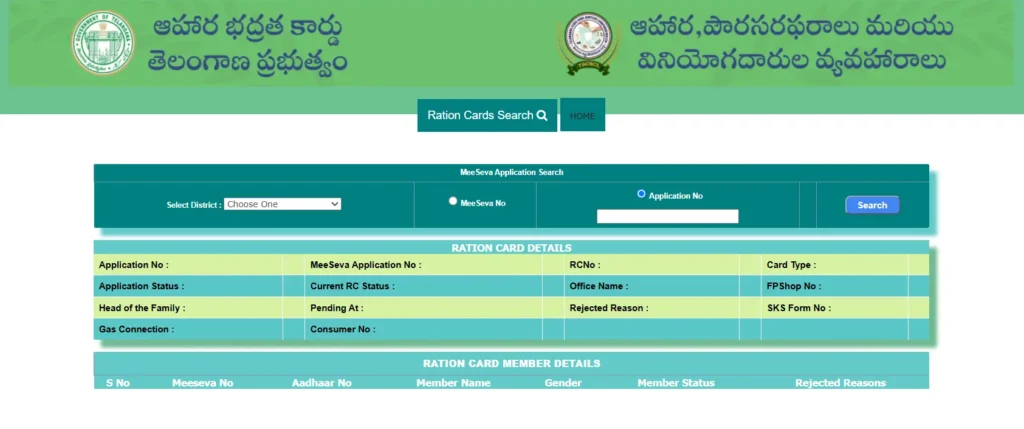
For recently submitted applications, transfers, or correction forms, you can track real-time approval progress.
- Open the FSC Search section and click on FSC Application Search.
- Select the district where the application was submitted.
- Input the application ID generated during submission (e.g., FSC0225XXXXXXXX).
- Click Search. The system will display one of the following real-time stages:
- Submitted / Under Review: Application received and queued for processing.
- Field Verification: Civil Supplies inspector is scheduled to conduct a physical address check.
- Approved: Application accepted; the FSC number is being generated.
- Rejected: Application denied. You must review the specified rejection reason.
Channel 4: Registered Mobile Number OTP Verification
When numerical card identifiers are lost and Aadhaar search is temporarily suspended, your linked phone number serves as a secure login tool.
- Select the Search by Mobile Number option under the FSC Search tab.
- Input your registered 10-digit mobile number and select your district.
- Click Send OTP.
- Enter the one-time password received on your device and click Submit to unlock and view your family’s FSC profiles.
Channel 5: Report-Based Demographic Workaround (Lost Identifiers)
If you have misplaced all identity documents and numbers, you can manually locate your details within your local village registry.
- Visit the ePDS portal and click on the Reports tab.
- Navigate to Ration Card Reports and select FSC Card Status Report.
- Select your District, your Office Name (Mandal), and your local Fair Price Shop (FPS) number.
- This action compiles a complete public listing of all households registered under that specific dealer, allowing you to scan for your family details and retrieve your card number.
Special District Selection Rules for Hyderabad (GHMC Area) Residents
Because the ePDS database indexes records by distinct administrative districts, residents in the Greater Hyderabad Municipal Corporation (GHMC) area frequently encounter search errors due to incorrect district mapping.
The Border Area Mismatch
GHMC spans across multiple administrative boundaries. If you live in urban border localities like Kukatpally, Serilingampally, Miyapur, LB Nagar, Uppal, Malkajgiri, or Alwal, your ration card might be registered under Medchal-Malkajgiri, Rangareddy, or Sangareddy instead of Hyderabad.
CRITICAL RULE: Selecting “Hyderabad” from the dropdown menu for a card registered in Rangareddy will result in a “No Records Found” error, even if you live within city limits. Always verify your registered district by checking your property tax receipt, electricity bill, or original MeeSeva application slip.
Hyderabad GHMC Zone and Circle Mapping
FSC services within the capital are strictly organized by administrative zones:
| Zone | Circle Coverages | Key Localities |
|---|---|---|
| Central Zone | Charminar, Golconda, Bandlaguda, Chandrayangutta, Bahadurpura | Old City heritage areas, High-density housing hubs |
| South Zone | Chaitanyapuri, Malakpet, LB Nagar, Rajendranagar, Saroornagar | Dilsukhnagar, LB Nagar residential corridors |
| East Zone | Uppal, Kapra, Malkajgiri, Alwal, Secunderabad | Uppal, Nacharam, Secunderabad Cantonment |
| North Zone | Kukatpally, Quthbullapur, Gajularamaram, Medchal | KPHB, Miyapur, developing suburbs |
| West Zone | Serilingampally, Khairatabad, Secunderabad (parts) | Gachibowli IT Corridor, Banjara Hills, Jubilee Hills |
| Central Admin | Amberpet, Nampally, Musheerabad, Asifnagar | Administrative city center, Mixed commercial-residential zones |
Tip: If your assigned Fair Price Shop is located too far from your current residence due to intra-city migration, you can officially submit an FPS transfer request at any MeeSeva center by presenting a current Hyderabad address proof (such as a GHMC property tax receipt or recent electricity bill).
Mandatory e-KYC and Aadhaar Seeding Workflows
To maintain the integrity of the state welfare database and eliminate fraudulent allocations, the Government of Telangana enforces a strict, mandatory e-KYC and Aadhaar seeding policy.
Who Must Complete e-KYC?
Every family member listed on your Food Security Card—including the head of the household, adult dependents, and newly added members (newborns or spouses)—must complete individual biometric e-KYC verification. Missing the deadline results in the selective suspension of benefits for unverified members or the complete cancellation of the household’s card.
The Official MeeSeva Submission Workflow
MeeSeva is the official portal for submitting new applications or structural corrections. When applying for a new card or requesting changes, you must adhere to the following document integrity rules:
- File Format Restrictions: Supporting documents (Aadhaar cards, domicile proofs, marriage/birth certificates, and income certificates) must be compiled and uploaded in PDF format only.
- Size Ceilings: The combined size of all compiled PDF documents must not exceed a strict limit of 3 MB. (Note: Legacy MeeSeva forms may specify a 50 KB limit for older system modules, but the active portal enforces a 3 MB limit for document packets).
- Administrative Fee: Processing any new application or database modification at a MeeSeva center requires a service charge of ₹30 to ₹35.
In-Person Biometric Seeding at Fair Price Shops
For stable residents, the easiest way to complete e-KYC is in person at your local ration shop:
- Visit your designated Fair Price Shop with the original Aadhaar cards of all family members.
- Inform the FPS dealer that you need to complete your mandatory e-KYC.
- Each family member must scan their fingerprint or iris on the electronic Point of Sale (ePoS) device.
- The ePoS system matches your live scan with UIDAI records to seed and authenticate your identity in real time.
- This service is entirely free at all official Fair Price Shops in Telangana.
Troubleshooting Common ePDS Portal Errors: Technical Root Causes and Solutions
When interacting with the ePDS database or searching for your card status, you may encounter system-level discrepancies:
Error 1: “No Records Found”
- Technical Cause: Typographical errors in input, district selection mismatch, or searching with an Aadhaar number that has not been seeded into the state PDS database.
- Resolution Protocol: Re-enter your Aadhaar number continuously without spaces or dashes. Cross-reference original receipts to confirm your registered district. Try searching by entering your FSC card number directly.
Error 2: “Aadhaar Not Seeded”
- Technical Cause: The cardholder’s Aadhaar number was either not provided during the initial application or the linking process remained incomplete, leaving the database records unmapped.
- Resolution Protocol: Visit your nearest MeeSeva center or Fair Price Shop with your physical Aadhaar card and existing ration card to trigger manual seeding.
Error 3: “Biometric Authentication Failed”
- Technical Cause: Outdated biometric templates in the central UIDAI database, poor fingerprint quality (frequently seen in elderly individuals or manual laborers with faded prints), physical injury, or dusty scanner glass.
- Resolution Protocol: Clean your hands thoroughly before scanning. Ask the dealer to clean the scanner glass. If fingerprints fail repeatedly, request an alternative iris scan or an Aadhaar-linked mobile OTP verification. To permanently resolve this, visit an Aadhaar Enrollment Center to update your biometrics.
Error 4: “Member Not Found in Family”
- Technical Cause: Your Aadhaar is seeded in the state database but has not been indexed under your family’s specific household card.
- Resolution Protocol: Submit a formal “Member Addition” correction form via MeeSeva along with relationship proof documents (birth or marriage certificate).
Error 5: “Duplicate Aadhaar Found”
- Technical Cause: The system detects your Aadhaar number active on another ration card (e.g., an old joint family card or a card from a previous address).
- Resolution Protocol: MeeSeva centers cannot unlink records. You must visit your District Civil Supplies Office in person. Submit an unlinking request to remove your Aadhaar from the old card, then seed it onto your correct card.
Error 6: “Status Not Available” or Connection Timeout
- Technical Cause: Server congestion on the ePDS portal, browser cache conflicts, or local internet speeds below 1 Mbps.
- Resolution Protocol: Access the portal during non-peak hours (before 9:00 AM or after 7:00 PM). Clear your browser cache completely (Ctrl + Shift + Del). Switch from local WiFi to mobile data to bypass routing lag on public networks.
FSC Integration within Broad State Welfare Portfolios
In Telangana, the Food Security Card is no longer just a document for collecting food grains; it has transitioned into a foundational state-level identity document. It serves as a mandatory gatekeeping credential for the state’s major development initiatives:
- Gruha Jyothi Scheme: Provides subsidized or free domestic electricity allocations up to established monthly limits. Applicants must enter their active FSC number to prove their economic status and link their service connection.
- Mahalakshmi Scheme: Direct financial assistance and cooking gas energy subsidies for women from low-income households.
- Indiramma Indlu Scheme: State-sponsored housing and low-interest construction loans. To apply or track your housing application via the portal (indirammaindlu.telangana.gov.in), you must submit an active FSC number.
- Yuva Vikasam Scheme: Educational support and scholarships for students from marginalized families.
- Cheyutha Scheme: Social security pensions for senior citizens, widows, and disabled individuals.
- Rythu Bharosa Scheme: Financial assistance and agricultural support programs for farmers.
Because of this tight integration, any technical discrepancy in your FSC record can immediately disrupt your family’s access to multiple social safety nets. Keeping your card active and your details updated is essential.
Frequently Asked Questions (FAQs)
How long does it take for a new ration card to be issued in Telangana?
Once your application is submitted via MeeSeva with correct documents and verified by field inspectors, the physical card is typically generated and delivered within 15 to 30 working days.
What are the landholding eligibility limits for a Pink FSC in Telangana?
To qualify for a Priority Household (PHH) Pink Card, the family’s agricultural landholdings must be below 3.5 acres of wet land (wetland) or below 7.5 acres of dry land (dryland).
Can I collect my ration from another state using my Telangana FSC?
Yes, under the One Nation One Ration Card (ONORC) scheme. If your Aadhaar is linked to your FSC and biometric e-KYC is complete, you can collect your entitled food grains from any active Fair Price Shop across India using biometric authentication.
My minor child does not have an Aadhaar card. Can they be added to our FSC?
Yes. Children under 5 years old who do not yet have an Aadhaar card can be added to your Food Security Card temporarily by submitting their official birth certificate. However, once they turn 5, they must enroll in Aadhaar and complete biometric linking to continue receiving allotments.
Who can I contact if my Fair Price Shop dealer refuses to distribute ration?
If you face issues with a dealer, you can lodge a formal complaint online through the state’s ePDS Grievance Redressal System (epds.telangana.gov.in). Alternatively, you can call the official toll-free Civil Supplies helplines at 1967 or 1800-4250-0333.
Disclaimer: This is an independent informational guide based on publicly available data from the official ePDS Telangana portal. For official transactions, administrative queries, and to submit personal details securely, always use the government’s authorized portal at epds.telangana.gov.in.